The monitoring page gives teachers and invigilators one live view of the class, showing who is working, who may need help, and who has handed in. It now keeps connection activity, received answers, and confirmed hand-ins separate to make it clear.
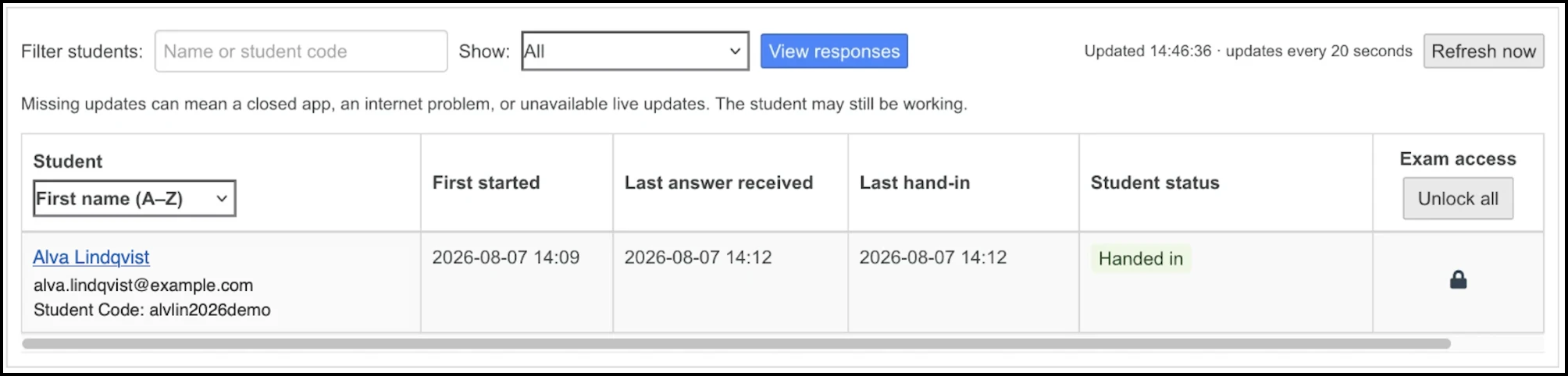
The roster keeps the familiar structure with student details, start and activity times, hand-in information, student status, and exam access.
Statuses clearly distinguish not started, working, working again, connection warning, handed in, unlocked for return, working offline, and absent or pen-and-paper students.
Connection warnings are based on recent heartbeats or answer activity, but a warning does not necessarily mean the student has stopped working or is offline - it is a call to action by the teacher in the classroom to verify student connectivity upon hand-in.
Only a server-confirmed hand-in counts as completion. Unlocking an exam does not reduce the hand-in count until the server confirms the student has returned to work.
Summary counts separate connection warnings, working students, handed-in students, and students waiting to start. Filters and sorting do not change the underlying counts.
Exam access controls still apply to the whole class for bulk actions, even when the roster is filtered, and locking an exam does not count as handing it in.
The monitor refreshes regularly, freezes stale data when updates stop, and warns before ending the exam if there may be unfinished or stale work.
The change affects only the teacher monitor and is available in English, Swedish, and Finnish.
Comments